






Let’s get straight to it. As of now, there’s no official Stake Casino app for either Android or iOS. I spent several days using the platform through its mobile website on both devices, and after switching between them a few times, I never really felt like I was missing a dedicated app. The navigation stayed smooth, pages loaded quickly, and moving between live betting and casino slots felt natural without any frustrating delays.
At first, I expected the browser version to come with a few compromises, but that wasn’t the case once I started using it regularly. Everything responded the way I wanted, and placing bets or launching games felt just as straightforward as it would in a native app. Even though the official Stake app still hasn't launched, the mobile experience already feels polished enough that I didn't see it as a drawback. If this is the standard of the browser version, I wouldn't be surprised to see an official app arrive in the near future. Want to know more? Then keep reading today's review!
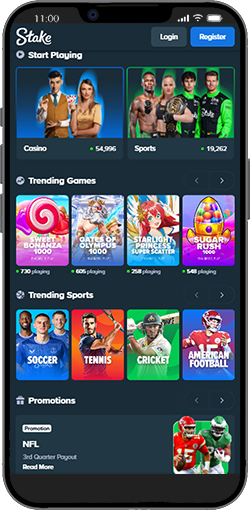
At the moment, there’s no iOS Stake app available in most regions, so I used the Stake mobile website instead on Safari across an iPhone 13, iPhone 14, and an iPad Pro. After spending some time with it, I was surprised by how well everything adapted to the screen. Sports markets, live dealer tables, and casino games all felt comfortable to use, scrolling stayed smooth, and the buttons responded instantly whenever I switched between different sections. I also had no issues making deposits, requesting withdrawals, or contacting live chat directly through Safari, and staying logged in between sessions made it feel even closer to using a dedicated app. Based on how polished the experience already is, I can easily see the official Stake app arriving in the near future.
How to Add Stake to Your iPhone Home Screen:
Open Safari and visit stake.com.
Tap the Share icon (square with the arrow).
Scroll down and choose Add to Home Screen.
Rename it “Stake Casino” (optional).
Tap Add, and it’ll appear on your screen like a real app.
Once I added it to my Home Screen, it launched in full-screen mode and felt almost identical to using a native iOS Stake casino app. The difference was minimal during everyday use, which made the browser version much more convenient than I initially expected.
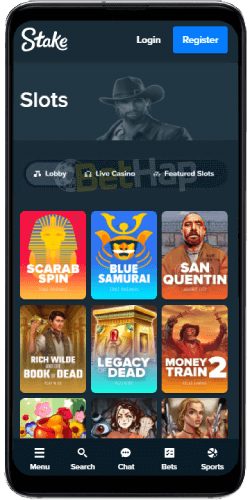
There’s currently no official Stake APK for Android, so I’d avoid any third-party download claiming to be one. Instead, I spent some time using the mobile version in Chrome on a Samsung Galaxy S22, Samsung Galaxy S23, and Google Pixel 6 to see how it performed in everyday use. It loaded quickly, felt lightweight, and responded smoothly every time I switched between different sections. I played slots, joined live games, and even tested crypto transactions without running into lag, crashes, or anything that interrupted the experience. The layout also worked well on a touchscreen, with an easy-to-reach bet slip and quick access to the casino sections, so navigating around never felt like a chore.
Even though there’s still no official Stake app for Android, adding the Stake platform to my device’s Home Screen made using it much more convenient. Once it was there, opening the site felt almost like launching a regular mobile app, and I rarely noticed that I was actually playing through a browser.
How to Add Stake to Your Android Home Screen:
Open Chrome and go to stake.com.
Tap the three-dot menu (top-right corner).
Select Add to Home screen.
Rename it “Stake Casino.”
Tap Add, and you’ll get an icon shortcut that behaves just like an app.
Once I pinned it to my Home Screen, Stake opened in full-screen mode, so I barely noticed I was using a browser. It made the whole experience feel smoother and much closer to a dedicated app.
After spending time with the Stake mobile website on an iPhone 13, Samsung Galaxy S22, and iPad Pro, I got a good idea of how it performs across different devices. Whether I was playing crypto casino games or placing bets on live sports betting, everything worked directly in the browser without making me feel like I was missing a dedicated app.
One of the first things that stood out was how quickly the homepage loaded, even when I switched to mobile data. Finding my way around didn't take long either. The Sports, Casino, Live, and Promotions tabs stayed within easy reach, while the bet slip remained fixed at the bottom, so placing a bet never meant searching through different menus. Moving between the casino and sportsbook also felt seamless, with no noticeable loading screens slowing things down.
I spent most of my time in the casino section, trying a mix of slots, live dealer games, and crash titles like Mines and Plinko. Every game I launched opened almost instantly, the graphics stayed sharp, and I didn't experience any stuttering during longer sessions. The sportsbook delivered the same kind of consistency. While following live events, the odds updated automatically, so I never had to refresh the page to keep up with what was happening.
I also tested both deposits and withdrawals using crypto and a bank card to see how the payment process worked in practice. The platform detected my preferred currency without any extra setup, and both BTC and USDT transactions were completed in just a few minutes, which made the whole process feel straightforward.
Another thing I appreciated while using the site was that security features never got in the way. HTTPS encryption, two-factor authentication, and automatic session saving meant I could switch between devices, sign back in, and continue where I had left off without any hassle.
After using it across several devices, it became clear that the mobile version delivers a consistently smooth experience. It feels stable, responsive, and comfortable enough for everyday play, and most of the time I stopped thinking about the fact that I was using a browser. Until there's an official app, this already feels very close to using a Stake casino app in practice.
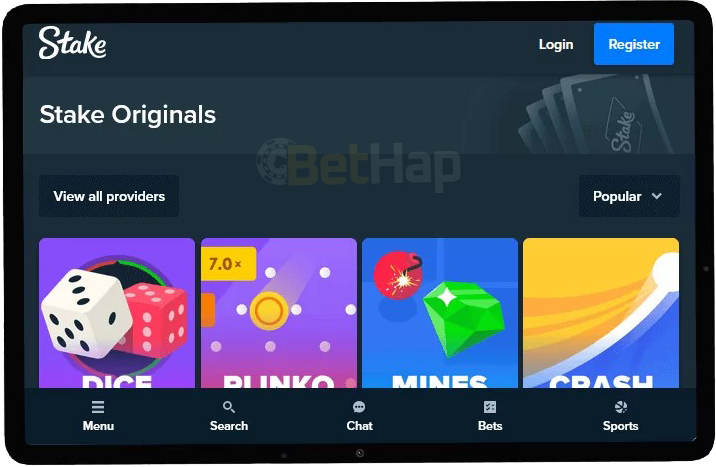
After using the Stake mobile website for about a week on both Android and iOS, I had a much clearer picture of what the mobile experience is actually like. The longer I used it, the more natural it felt. It stayed fast, responsive, and easy to navigate throughout my sessions, without making me feel like I was missing a native app. These are the features that stood out the most to me after spending time with the platform in everyday use.
One of the first things I noticed while using the platform was how quickly everything loaded. Pages opened almost instantly, live odds updated without interruption, and slots started in just a few moments. I also tried it during busy match days to see how it would handle heavier traffic, and I didn't run into lag or buffering. Whether I was using Safari on an iPhone or Chrome on Android, page load times consistently stayed under three seconds, which honestly felt faster than many casino apps I've used.
The Stake mobile online casino kept everything within easy reach while I was playing. I could switch between Sports, Casino, Live, and Promotions from the top bar in just a tap, and the floating bet slip stayed visible without getting in the way. The menus moved smoothly, and even on a smaller screen, I never had trouble reading the text or tapping the buttons comfortably.
I found all the casino categories from the desktop version here, including slots, live dealer games, game shows, crash titles, and original Stake games like Dice, Mines, and Plinko. Every game I launched opened in a separate full-screen view that felt well optimized for touch controls. I also liked using the casino filters, since they made it easy to sort games by volatility, provider, or theme and quickly find the ones I wanted to play.
I placed several live bets during Premier League and NBA games to see how the sportsbook handled fast-moving markets. The odds updated in real time throughout the matches, and the interface adjusted automatically whenever something changed. My bet confirmations appeared almost instantly, so I never felt like I was waiting for the platform to catch up. I also used the bet slip for singles and multis, and having the cash-out option available directly in the browser made managing my bets much more convenient.
I spent some time testing Stake's mobile cashier to see how it handled crypto payments in everyday use. It supports Bitcoin, Ethereum, Litecoin, Dogecoin, and USDT, and the crypto deposits I made appeared in my balance within a few minutes. I also liked that the interface recognized the wallet type automatically, and scanning a QR code made completing transactions much quicker than entering wallet details manually.
While using the mobile site, I also paid attention to the security features rather than just how it performed. It uses SSL encryption and two-factor authentication, and I was able to use biometric login through my browser, which made signing in quicker without sacrificing security. I also noticed responsible gambling tools like deposit limits and time reminders were easy to access whenever I needed them. Even though there's no dedicated mobile app, I felt comfortable entering my personal details because the platform handled my information securely throughout my time using it.
I also switched between my phone and tablet a few times to see how well everything stayed in sync. My active bets, casino activity, and session progress carried over without any issues, so I could start playing on one device and continue on another without losing my place, even without a dedicated mobile app.
After using the platform across different devices and over several sessions, the Stake mobile website never felt like a temporary alternative. It handled everyday play smoothly, whether I was placing bets or playing casino games, and it was comfortable enough that I rarely thought about the absence of a dedicated app.
| Pros: | Cons: |
|---|---|
| - Lightning-fast load times on both Android and iOS | - No official app (yet) for push notifications |
| - Full casino, sportsbook, and bonus functionality | - Requires browser login each session (unless saved) |
| - Clean and intuitive design | - Offline play not supported |
| - Secure crypto payments with instant confirmations | - Some older devices may lag during live streams |
| - No download or updates needed | - |
| - Compatible with all major browsers | - |
| - Live chat and support easily accessible | - |
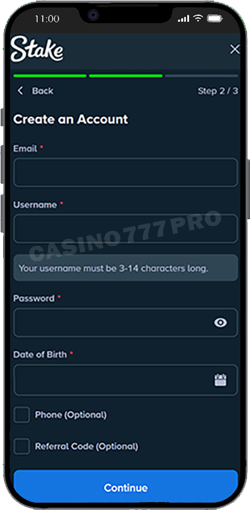
Even though there's no downloadable Stake app, creating an account and logging in through the mobile site was a straightforward process when I tried it. I tested it on both Safari using an iPhone 13 and iPhone 14, as well as Chrome on a Samsung Galaxy S22 and S23, and the whole registration took less than a minute. The interface felt clean, the forms were short, and my account was verified almost immediately.
Here’s how I registered on Stake mobile:
Open stake.com in your mobile browser.
Tap “Register” at the top-right corner.
Enter your email, username, and password.
Choose your preferred currency (crypto or fiat).
In the dedicated “Code” field, type Promo code - BETHAP for Welcome offer
Confirm that you’re over 18 and accept the terms and conditions.
Check your email and confirm your account. Once I verified mine, it was ready to use right away.
If you already have an account, simply tap “Login” on the homepage, enter your details, and enable Face ID or Touch ID in your browser if your device supports it. I found this made signing in much quicker during later sessions. The site also remembered my previous session, so getting back to betting and casino games only took a few seconds.
After logging in a few times on different devices, the process always felt quick and reliable. Even without an official Stake app, accessing my account through the mobile browser was convenient enough that I never felt it slowed me down.
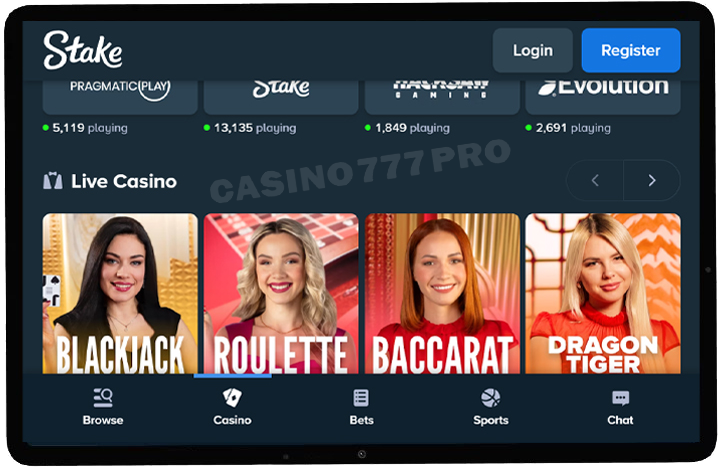
I spent quite a bit of time exploring Stake's mobile casino, and it turned out to be one of the most complete browser-based gaming experiences I've used. Even without a downloadable Stake casino app, it worked smoothly on both Android and iOS throughout my testing. I tried a wide variety of games, from classic fruit machines to crash titles and live dealer tables, and every game I opened loaded quickly without interrupting the session.
Although there's still no official Stake casino app available, I never felt limited while using the mobile website. After playing across different devices and returning for multiple sessions, it handled everything consistently enough that using the browser became second nature.
I found Stake's slots and table games to be well optimized for mobile during my testing. The reels spun smoothly, the animations stayed sharp, and the betting controls felt comfortable to use without taking up too much screen space. I also had access to games from major providers, including Pragmatic Play, Hacksaw Gaming, Relax Gaming, and Play'n GO, so it was easy to switch between classic slots and higher-volatility titles depending on what I felt like playing. The table games, including roulette, blackjack, and baccarat, adapted just as well, whether I held my phone in portrait or landscape mode.
Popular Slots and Table Games at Stake Mobile
| Game Title | Provider | Game Type | Key Feature |
|---|---|---|---|
| Sweet Bonanza | Pragmatic Play | Slot | Tumble wins & multipliers |
| Wanted Dead or a Wild | Hacksaw Gaming | Slot | Bonus buys & sticky wilds |
| Big Bass Bonanza | Pragmatic Play | Slot | Fishing bonus round |
| European Roulette | Evolution | Table | HD wheel animation |
| Blackjack VIP | Pragmatic Play Live | Table | Multiple side bets |
I spent some time in the live casino section, where games from Evolution Gaming and Pragmatic Play Live were available to play on mobile. I tried titles like Lightning, Crazy Time, and Mega Wheel to see how they performed, and each stream started quickly and stayed in HD throughout my sessions. I didn't experience any freezing or disconnects, which made the overall experience feel just as comfortable as playing through a dedicated casino app.
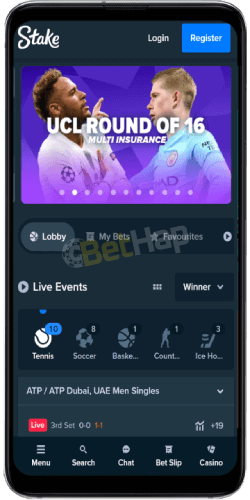
I spent just as much time using Stake's mobile sportsbook as I did exploring the casino, and the experience felt equally polished. I tested it during live football, tennis, and basketball matches, paying close attention to how it handled fast-moving markets. The odds updated in real time, switching between different events was straightforward, and the layout made it easy to find what I was looking for. The main sports stayed accessible at the top of the screen, while the side menu helped me filter leagues and events without slowing me down.
I was able to place bets across a wide range of betting markets directly through the browser, so there was no need to download a mobile app or use up storage space on my device. I simply opened the site, made a deposit, and started betting on live events. As with any mobile betting platform, I found that having a stable internet connection made the overall experience much smoother. Even without a dedicated app, I never felt limited while using the mobile version.
During my testing, I also noticed how broad the sportsbook selection was. Stake covers more than 40 sports, including football, basketball, tennis, MMA, esports, and motorsports, alongside smaller markets such as darts, table tennis, and futsal. I spent most of my time in the live betting section, where the real-time statistics and match graphics made it easier to follow events without leaving the page.
I also placed a few bets using crypto to see how the process worked in practice. Wagers in BTC, ETH, and USDT were available directly, so I didn't have to deal with currency conversions before placing my bets, which made the experience feel much more straightforward.
I also tested the payment process on mobile to see how it worked in everyday use. I made deposits and withdrawals using Bitcoin, Ethereum, Litecoin, Dogecoin, and USDT, and each transaction was completed within a few minutes. The cashier worked smoothly in both Android and iOS browsers, and I didn't run into unexpected fees or unnecessary verification delays while moving funds. Throughout the process, everything felt secure, so managing payments from my phone was just as straightforward as placing bets or playing casino games.
| Method | Min Deposit | Min Withdrawal | Processing Time | Notes |
|---|---|---|---|---|
| Bitcoin | $10 | $20 | 5–15 min | Fastest crypto method |
| Ethereum | $10 | $20 | 5–15 min | Reliable and popular |
| Litecoin | $10 | $20 | 5–10 min | Lower network fees |
| Dogecoin | $10 | $20 | 5–10 min | Great for small bets |
| USDT (Tether) | $10 | $20 | 5–15 min | Stable value transfers |
I spent time using both the mobile site and the desktop version to see how different the experience really was, and I found that they offer the same core features, including the casino, sportsbook, bonuses, and full crypto support. The desktop version gave me more screen space and made it easier to keep track of several markets at once, which I found useful during longer betting sessions. The mobile version, on the other hand, felt quicker to pick up for everyday use. Pages loaded fast, navigation was comfortable with one hand, and every game adjusted naturally to the smaller screen.
There's still no official Stake casino app, but after using the mobile site across different devices, I never felt like the browser version was missing anything essential. If an official Stake app is released in the future, I'll definitely be interested in trying it, but for now the mobile website already covers everything I need.
After switching between both versions over several days, I found myself using each for different reasons. I preferred the desktop version when I wanted a larger workspace, while the mobile site was the one I kept coming back to for quick betting sessions and casino games on the go. No matter which one I used, the overall performance stayed consistent, and my crypto transactions and account activity carried over without any issues.
After spending a lot of time testing Stake on both Android and iPhone, I came away with a very positive impression of the mobile experience. Even without a native Stake app, using the platform through the browser felt smooth from start to finish. Whether I was logging in, placing live bets, or making crypto withdrawals, everything worked consistently throughout my testing.
The casino games I tried loaded within a few seconds, the sportsbook kept up with live odds without interruption, and the overall layout stayed clean and easy to navigate. One thing that stood out to me was how stable the live casino streams remained, even during longer sessions. I also found the cashier quick and straightforward to use, which made managing deposits and withdrawals feel just as simple as playing.
Although I'd still like to see an official Stake app with features like push notifications, I never felt that the current mobile website was holding me back. After using it across multiple devices and over several days, it proved to be fast, reliable, and comfortable enough that I rarely thought about the fact I was playing through a browser instead of an app.