






For this review, I challenged myself to use only my phone for several days. No laptop, no desktop browser, just CocoBet on mobile. I wanted to see whether I could comfortably place bets, play casino games, make deposits, and manage my account without ever switching devices.
I installed the platform on both an iPhone 15 Pro and a Samsung Galaxy S24 Ultra, tested it on Wi-Fi and 5G, and used it during my daily routine instead of sitting down for dedicated gaming sessions. Some things genuinely impressed me, a few could still be improved, and here's exactly how my experience with the CocoBet app turned out.
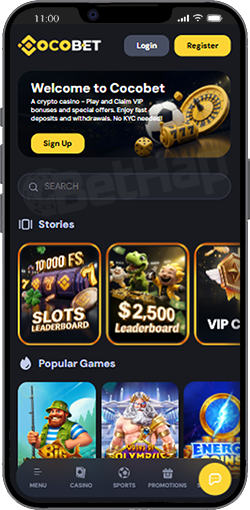
Yes, but not in the way you might expect. If you search the Apple App Store or Google Play Store, you won't find a traditional CocoBet app to download. Instead, CocoBet uses a Progressive Web App (PWA). In simple terms, this means you open the website once, add it to your home screen, and from then on it behaves almost like a normal app.
I know some people are sceptical about PWAs, so I was curious myself. After using it for several days, I honestly stopped noticing that it wasn't a native application. Here's how CocoBet is available on mobile:
| Platform | Available |
|---|---|
| iPhone (iOS) | ✅ Yes (PWA) |
| Android | ✅ Yes (PWA) |
| Apple App Store | ❌ No |
| Google Play Store | ❌ No |
| Mobile Website | ✅ Yes |
The biggest advantage is that you always use the latest version. There are no updates to install manually, and you don't have to wait for App Store approvals whenever CocoBet changes something. Another thing I liked is that the installation doesn't take up much storage space on your phone. If you're someone who already has dozens of apps installed, that's actually a nice bonus.
I tested the installation on an iPhone 15 Pro running the latest version of iOS. The process is very straightforward and took me less than a minute:
Open CocoBet in Safari
The first thing you need to do is visit the official CocoBet website using Safari. This is important because the "Add to Home Screen" feature works through Apple's browser.
Wait Until the Website Loads
Let the homepage load completely before doing anything else. It only takes a few seconds, but it helps the installation work properly.
Tap the Share Button
At the bottom of Safari, you'll see the Share icon. Tap it to open the menu.
Select "Add to Home Screen"
Scroll through the available options until you see Add to Home Screen. Tap it.
Confirm the Installation
Press Add in the top-right corner. That's it. The CocoBet icon immediately appears on your home screen alongside your other apps.
Here's the whole process in short:
Open CocoBet in Safari.
Tap Share.
Choose Add to Home Screen.
Confirm by pressing Add.
Launch CocoBet from the new icon.
After installing it, I logged in once and didn't have to repeat the process every time I opened the platform. It launches in full-screen mode, so it doesn't really feel like you're browsing a website anymore.
The Android version is just as simple. I used a Samsung Galaxy S24 Ultra with Google Chrome, although the process is very similar on other Android phones:
Step 1: Open the CocoBet Website - Go to the official CocoBet website using Chrome.
Step 2: Sign In - Log into your account as you normally would.
Step 3: Accept the Installation Prompt - Chrome automatically recognised that CocoBet supports installation and displayed an Install App prompt. If you don't see it immediately, you can also open Chrome's menu and choose Add to Home Screen.
Step 4: Confirm - Press Install. Within a few seconds, the application appears on your home screen.
The steps look like this:
Open CocoBet in Chrome.
Log into your account.
Tap Install App or Add to Home Screen.
Confirm the installation.
Open CocoBet from the new icon.
One thing I appreciated is that there were no APK downloads, no security warnings, and no need to enable installations from unknown sources.
Everything happens directly through Chrome, which makes the process much more comfortable for users who don't like downloading files from outside Google Play.
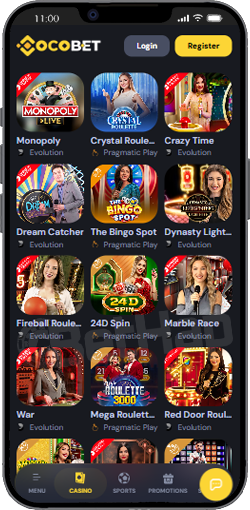
Installing the Cocobet app is one thing, but actually using it every day is what matters. Over several days, I found myself opening CocoBet for completely different reasons. Sometimes it was to place a quick football bet before leaving home. Other times I only wanted to check whether a tennis bet had settled. In the evenings, I usually spent more time in the casino.
I have to note - I used the Cocobet promo code - BETHAP when I opened my account. It did not give me specific bonus, but it made sure I am receiving the best promotions from now on, so it is worth it.
One thing I realised quite quickly is that the app makes it very easy to jump back into whatever you were doing. For example, one evening I stopped playing halfway through because I had to leave. Later that night, I opened CocoBet again, and within seconds I was back browsing the casino without having to search through different menus. During my testing, I regularly used the app to:
Check live football and basketball odds.
Play a few slot sessions after work.
Watch live blackjack tables.
Deposit funds.
Check previous bets.
Browse new casino releases.
Everything I normally do on desktop was available on my phone as well. That meant I almost completely stopped using my laptop during the testing period.
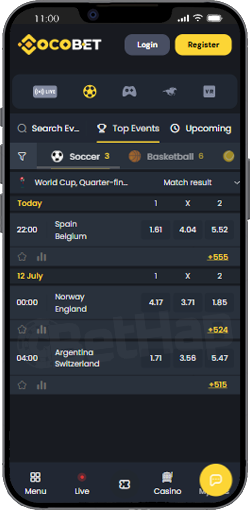
I wanted to see whether one section worked better than the other, so I spent time using both the Cocobet casino and the sportsbook. Here's how I'd rate them after several days.
| Section | My Experience |
|---|---|
| Slot Games | ⭐⭐⭐⭐⭐ |
| Live Casino | ⭐⭐⭐⭐⭐ |
| Sports Betting | ⭐⭐⭐⭐☆ |
| Live Betting | ⭐⭐⭐⭐☆ |
| Deposits | ⭐⭐⭐⭐⭐ |
| Withdrawals | ⭐⭐⭐⭐⭐ |
The casino is definitely where I spent most of my time. Opening different slots, switching providers and trying new releases all felt very natural on a smaller screen.
The sportsbook was equally easy to navigate, especially when checking pre-match markets. Live betting also worked well, although odds naturally refreshed often while matches were in progress. I also tested deposits and a withdrawal from my account.
A lot of people wonder whether it's worth adding CocoBet casino to the home screen or simply using the website in a browser. Since I tried both, here's what I found:
| Feature | CocoBet App (PWA) | Mobile Website |
|---|---|---|
| Opens from Home Screen | ✅ | ❌ |
| Full-screen view | ✅ | ❌ |
| Easy to reopen | ✅ | ⭐ Good |
| Same games available | ✅ | ✅ |
| Same promotions | ✅ | ✅ |
| Same payment methods | ✅ | ✅ |
Functionally, they're almost identical. The biggest difference is convenience. Once CocoBet is installed, it feels much more like opening WhatsApp or Instagram than opening a website in your browser. I personally preferred the installed version because I didn't have to open Safari or Chrome every single time.
No app is perfect, and CocoBet casino is no exception. There are a few things I'd still like to see.
A native App Store application for iPhone.
A Google Play version for Android users who prefer downloading apps that way.
More notification settings for sports events.
Face ID and fingerprint login options on every device.
None of these stopped me from using the platform, but they would make the overall experience even better. Apart from that, I honestly didn't run into any major problems during testing.
Yes, after finishing this review, I didn't delete it. That's usually how I decide whether a mobile app is worth recommending.
If I immediately remove it after testing, it probably didn't leave much of an impression. With CocoBet, it stayed on my phone because it became convenient to use. Opening the app takes only a second, checking upcoming matches is easy, and if I feel like playing a few casino games, everything is already there.
If you mainly play from your phone, I definitely recommend installing the CocoBet app instead of using the browser every time. The installation takes less than a minute, it doesn't use much storage, and after a day or two it simply feels like any other app on your device.