






Let’s make one thing clear from the start: Casinok does not have an official Android or iOS mobile app. There’s no APK, no App Store version, and no external download of casino apps. Before testing the platform, I expected that to make the mobile experience feel limited, but it didn’t take long to see that the browser version worked well on its own.
The Casinok mobile site loaded quickly, adjusted smoothly to different screen sizes, and stayed responsive throughout my sessions. Once I added it to my Home Screen, opening the platform felt very similar to using a lightweight app. In the rest of this review, I’ll show how it performed in everyday use and what stood out, even though there are no official casino apps available.
Even though there is no official Casinok Android app, the mobile website quickly stopped feeling like a compromise. I tried it on both a Samsung and a Xiaomi device, and the experience stayed smooth throughout. Pages opened quickly, live games ran without noticeable lag, and finding my way around the sportsbook felt straightforward. The layout adjusted naturally to each screen, so even longer menus and game categories never felt crowded.
There may be no casino apps to download, but Casinok still handled mobile play better than I expected. Compared with some of the online casinos I have used, moving between games, bonuses, and betting sections felt simple and comfortable from the start.
To make access even quicker, I added the Casinok website to my Home Screen. This created a shortcut that opened the platform in its own window and made it feel much closer to a regular app.
To do this:
Open Casinok → tap the browser menu → “Add to Home Screen.”
Once the shortcut was there, the site opened almost instantly and remembered my previous login. I could return to casino games or betting markets with a single tap, and after a few sessions, I barely noticed that everything was still running through the browser.
On iPhone, I expected the lack of a native app to be more noticeable. After trying the Casinok mobile website on both an iPhone 11 and iPhone 14, that concern disappeared fairly quickly. Pages loaded fast, animations stayed smooth, and the casino games I opened ran without noticeable delays, including the live dealer tables. Compared with some casino apps I have used, the browser version felt just as polished during everyday play.
As on Android, I added the website to my Home Screen to make access quicker. This was the closest alternative to having a dedicated Casinok app.
To add it:
Open Casinok in Safari → tap the Share icon → choose Add to Home Screen.
The shortcut created an app-style icon that opened the mobile site in a clean, full-screen window. My login details remained saved, payments worked without interruptions, and the interface stayed stable even during busier periods. After a few sessions, opening Casinok from the Home Screen felt completely natural, and I never missed having to install anything.
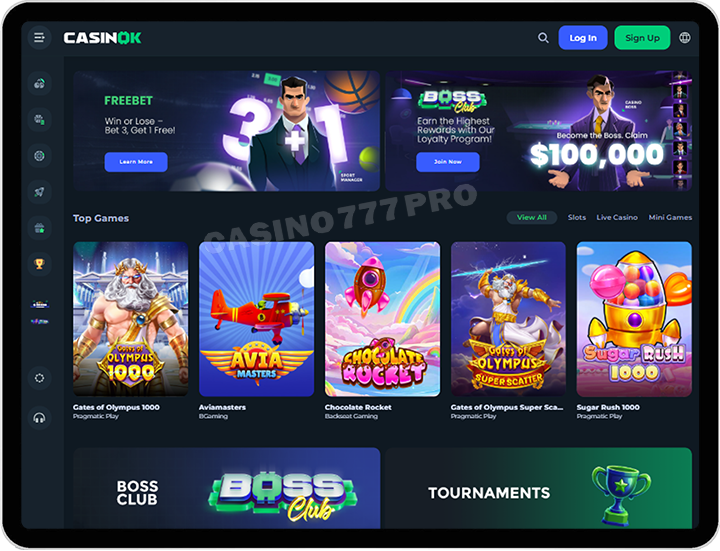
Even though there are no casino apps, a few features made the mobile experience with Casinok online casinos much more convenient than I expected.
The mobile site felt lightweight from the first session. Whether I moved between the casino, sportsbook, bonuses, or payment section, pages opened quickly, even while I was using an average 4G connection.
Adding Casinok to my Home Screen made a noticeable difference. The site launched almost instantly, opened without the usual browser bar, and gave me direct access to my account with a single tap.
Finding games never felt difficult on a smaller display. Slots, jackpots, and live tables were arranged into clear categories, the filters responded quickly, and every title I selected opened without sending me through extra pages.
The live casino performed better than I expected from a browser-based platform. Tables loaded quickly, the streams stayed stable, and I experienced very little lag during my sessions.
Nothing important was missing from the sportsbook on mobile. I could browse markets covering football, esports, and other events, while live odds continued updating without noticeable delays
One advantage I came to appreciate was not having to install anything. The site used no additional storage, required no app updates, and was ready to use whenever I opened it.
After a few sessions, the mobile website covered everything I would normally expect from a native app, without the installation process.
Pros | Cons |
|---|---|
| - No installation required | - No native mobile app |
| - Works on any mobile device | - No push notifications |
| - Fast loading and easy navigation | - Must rely on browser tabs |
| - Full casino + sports betting experience | - |
| - Supports home-screen shortcut (Android & iOS) | - |
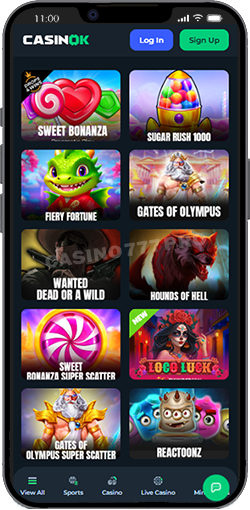
The Casinok mobile casino gave me plenty to explore, but the loading speed was what stood out first. Slots opened almost immediately, while the live games stayed stable even during busier hours. I used the site on both Android and iPhone, and the graphics remained smooth across high-RTP slots, quicker live titles, and the other categories I tried.
During my November sessions, I also spent time checking the available promotions and moving through the casino page. Everything felt well organised, and I had no trouble seeing table limits, game providers, or bonus features on a smaller screen. That level of clarity made choosing a game much easier, especially compared with some casinos where important details are hidden on mobile.
| Category | Game Example |
|---|---|
| Slots | Book of Sun Multichance, Hot Hot Fruit, Tiger Claws Deluxe |
| Live Casino | Blackjack Azure, Speed Baccarat B, Mega Roulette |
| Table Games | European Roulette Mobile, Caribbean Poker |
| Crash Games | Aviator, Cricket X |
The Casinok mobile sportsbook felt more complete than I expected from a platform without a native app. I used it for both football and tennis, and the markets opened quickly while statistics appeared without making me wait. Live odds kept updating with very little delay, even when I moved between different events.
Browsing leagues felt just as straightforward as it did on desktop. I could move through the Premier League, La Liga, NBA, cricket tournaments, esports, and a wide range of smaller markets without getting lost in the menus.
The bet slip was another part that worked well on mobile. It stayed clean, could be collapsed when I needed more screen space, and handled accumulators without feeling cramped. Cash Out also responded quickly whenever it was available.
After several betting sessions from my phone, I found the mobile site fast enough that I never felt held back by the lack of an app. In practice, it performed more smoothly than some dedicated betting apps I have used.
The payment section on Casinok’s mobile site was easy to use from the first deposit. Funds appeared quickly in my account, while withdrawals depended on the required verification steps but still went through smoothly during my testing. Once my account was ready and I had met the bonus conditions, requesting a payout was straightforward.
Whenever I needed clarification, I could reach the support team by live chat or email directly through the website. The FAQ section was useful as well, especially for common questions about payments, bonuses, and withdrawals.
Below is a table covering the most common banking options:
| Method | Type | Deposit Time | Withdrawal Time | Notes |
|---|---|---|---|---|
| Visa / Mastercard | Bank Cards | Instant | 1–3 days | Widely supported |
| Skrill / Neteller | E-wallets | Instant | Up to 24 hrs | Fast withdrawals |
| Jeton / MuchBetter | Wallets | Instant | Within 24 hrs | Good for mobile users |
| Bank Transfer | Local Banks | 10–30 min | 1–5 days | Best for higher amounts |
| Crypto (BTC, ETH, LTC, USDT) | Cryptocurrency | Instant | 10–60 min | Lowest fees & fastest payouts |
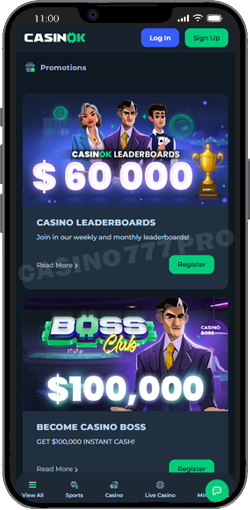
Since Casinok does not offer a native app, I treated the mobile website as the main way to use the platform on my phone. In practice, that worked better than I expected. The browser version felt light, opened quickly, and stayed up to date without using storage space or asking for additional permissions.
Adding a shortcut on Android or iOS made access even easier. With one tap, I could open my account in a standalone window and continue where I had left off. The main differences compared with a native app were the lack of push notifications and offline access, but neither affected the way I normally played.
Responsible gambling tools were easy to find as well. The self-exclusion option is available to both new and registered players, so anyone who feels that gambling is no longer enjoyable can take a break or stop playing. I appreciated having that control directly through the website, alongside the platform’s licensing and account security information.
Once signed in, I could check the available bonuses, follow my progress in the VIP program, play games such as blackjack, wager on sports, and request withdrawals from the same mobile interface. From gameplay to payment processing, everything worked much like a modern betting app, only without the download. For the way I used Casinok, the browser version felt simpler and more practical.
Even without a native iOS or Android app, Casinok gave me a smooth mobile betting experience throughout my testing. The website stayed clean, stable, and quick to load, and once I added it to my Home Screen, I could return to my favourite games or betting markets with a single tap. Slots and live games ran without noticeable issues, payments were straightforward, and moving between the sportsbook and casino never felt awkward.
For anyone who prefers not to fill their phone with extra applications, the Casinok mobile version is a practical option. It feels close to using a modern app without taking up storage space or requiring manual updates. After several sessions, I stopped thinking about the lack of a download because the mobile website already handled everything I needed.